RX 7900 XTX runs Plane Accident at approximately ~126 FPS at 1080p High settings — verdict: SMOOTH. At 1440p: ~86 FPS (SMOOTH). At 4K: ~57 FPS (PLAYABLE).
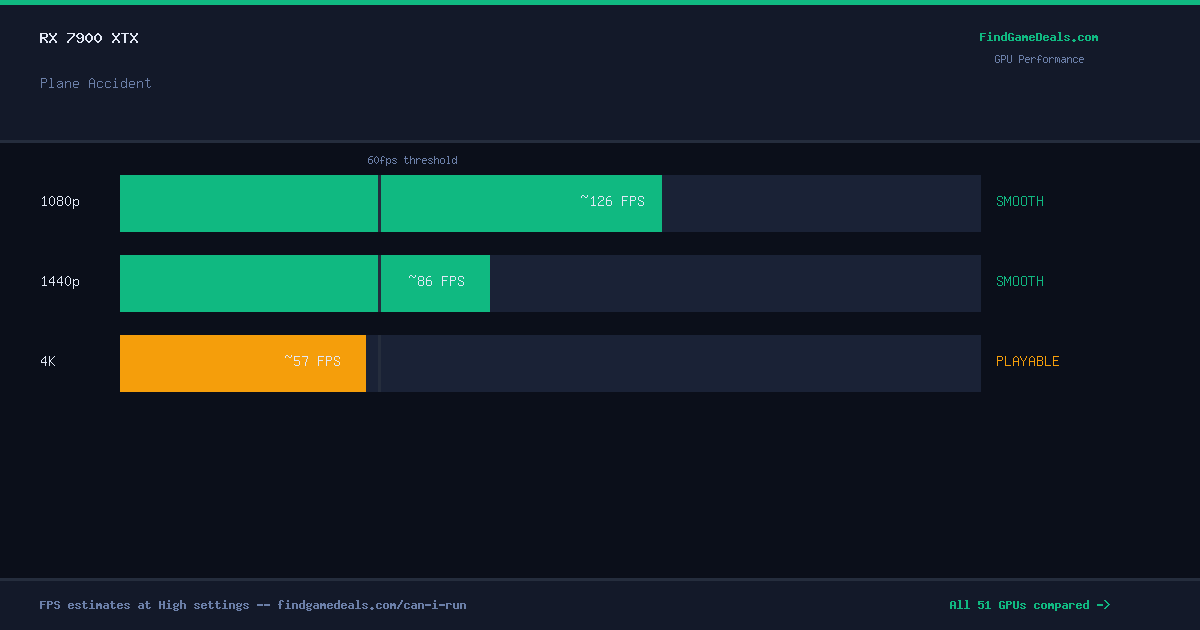
The RX 7900 XTX delivers ~126 FPS in Plane Accident at 1080P High settings — exceeding the 60 FPS smooth-play threshold by 66 FPS. This GPU is a strong match for high-refresh-rate monitors on this title. No upgrade needed.
Plane Accident RX 7900 XTX Benchmark & FPS at 1080p, 1440p & 4K
Performance Optimizer
Live SimulationBest price now
Compare all GPUs for Plane Accident
Frequently asked questions — RX 7900 XTX & Plane Accident
Can I run Plane Accident on RX 7900 XTX?
Yes. The RX 7900 XTX delivers approximately 126 FPS in Plane Accident at 1080p High settings. This exceeds the 60 FPS smooth-play threshold — gameplay is fluid without any adjustments needed.
What FPS does RX 7900 XTX get in Plane Accident at 1440p?
The RX 7900 XTX averages approximately 86 FPS in Plane Accident at 1440p High settings — verdict: SMOOTH. Excellent result for high-refresh-rate 1440p monitors.
Can RX 7900 XTX run Plane Accident at 4K?
The RX 7900 XTX averages approximately 57 FPS in Plane Accident at 4K High settings — verdict: PLAYABLE. 4K is achievable but reducing to Medium settings will significantly improve frame pacing.
Is Plane Accident worth buying right now?
The current best price for Plane Accident is $4.12. FindGameDeals tracks price history across all major PC game stores and issues a BUY or WAIT verdict based on how the current price compares to the all-time low.
About Plane Accident
Become an inspector examining causes of plane crashes. Visit the crash site, gather evidence and interrogate witnesses. Explain whether the accident was caused by independent factors or human errors.
View all deals for Plane Accident →